Sale
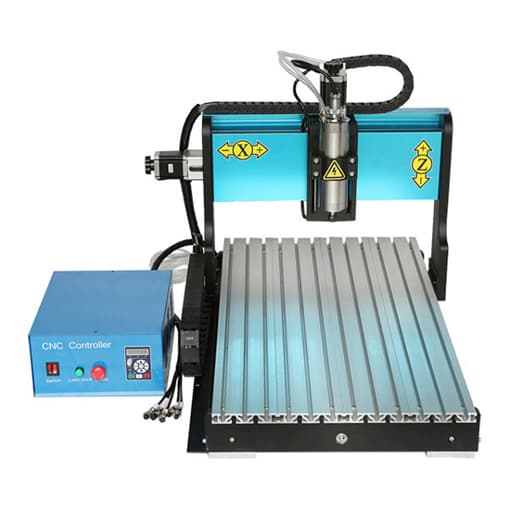
Desktop CNC Engraver Machine, 600 x 400 x 120mm
Price range: $502.99 through $718.37
78
People watching this product now!
Description
The CNC engraver machine with ideal price and multifunction. Not only can be used for engraving and carving, but also for cutting.
Specification
| Model | T-CNC-6040 |
| Working Area | 600*400*120mm (24*16*5 inch) |
| Power Supply | AC 110V/220V |
| Spindle Power | 800W, 1500W |
| Motor | 57 type 76 length stepper motor |
| Driver | Independent drivers |
| Material Feed Height | 150mm |
| Table Size | 480*840cm |
| Control System | Mach3/DSP/Ncstudio |
| Working Speed | 50-4000mm/min |
| Working Accuracy | 0.03-0.05mm |
| Warranty | 6 months |
| Packing Weight | 122 kg |
Applications of Desktop CNC Engraver Machine
- Engraving, milling and cutting on PVC, acrylic, double color board, solid wood plate and soft metal materials.
- Engraving/carving on PCB, wood models/molds and handicrafts.
- Drilling and milling on plastic boxes, aluminum alloy cases and panels that do not exceed the specified specifications.
- 3D engraving, drilling, milling and cutting for metal materials such as aluminum alloy and copper at a low feed rate.
- Use the engraver machine as a simple 3D CNC worktable, in experimental laser engraving/carving, CNC dispensing, CNC positioning, metal (nameplate) marking, etc.
- Suitable for industrial/commercial use, technology development, advertising design, art creation, teaching and DIY enthusiasts.
Dimension Diagram
Configurations of Desktop CNC Engraver Machine
|
Tips: Common troubleshooting for desk CNC engraver machine.
- When opening software, the computer prompts: Failed to open the card, please check the card.
- Check if the driver of board card is installed well, or change a PCI slot for board card.
- Reinstall the two data cables and check whether there is any broken needle.
- There is a problem with board card, replace a new one.
- The sending software cannot be opened normally, and the engraved material is deformed.
- Reinstall the new system and software.
- Check whether the X and Y axis screw rods and screws are loose.
- There is a problem with the engraving cutter, replace it with the correct one.
- Misalignment or wrong size occurred during engraving.
- Check whether the path of engraving software is correct.
- Check gap size of the screw rod and whether the fastening screw of polished rod is loose.
- Check whether the software parameter settings are correct.
- When the X-axis travels for a certain period of stroke, the Z-axis does not lift cutter, or the stroke is reversed.
- Check whether the Z-axis motor is operating normally, power and driver current, or its own failure.
- Check whether the Z-axis motor cable has poor contact or intermittent disconnection.
- There is a limit phenomenon during engraving process.
- Check whether the engraving path exceeds the engraving range.
- Soft-limit is set in the software parameter setting.